
What we changed in Recallify after listening to participants in our Long Covid pilot study.
By the Recallify Product Team
Last week we published the findings from our two-week pilot study, in which ten adults tested Recallify as a Long Covid memory app. Participants told us in detail what worked, what didn't, and what they wished was different. This post is about what we've shipped in response.
Most of these changes are small. A few are bigger. All of them came directly from things participants said in interviews, in the coaching check-ins, or in the feedback tables in the whitepaper.
What's new in this Long Covid memory app update
This release includes recurring reminders (the most-requested feature from the pilot), a new Today panel on the home tab, a friendlier time picker, system-wide respect for accessibility settings, and a handful of smaller polish improvements. The detail is below.
Recurring reminders are here
This is the change participants asked for most directly. One pilot participant discontinued the study early because they could not set up daily and weekly reminders for their medication. Several others told us in interviews that recurring routines were a core reason they had reached for a memory tool in the first place. Without recurring reminders, Recallify could capture a one-off task or appointment, but it could not yet hold the rhythm of a week.
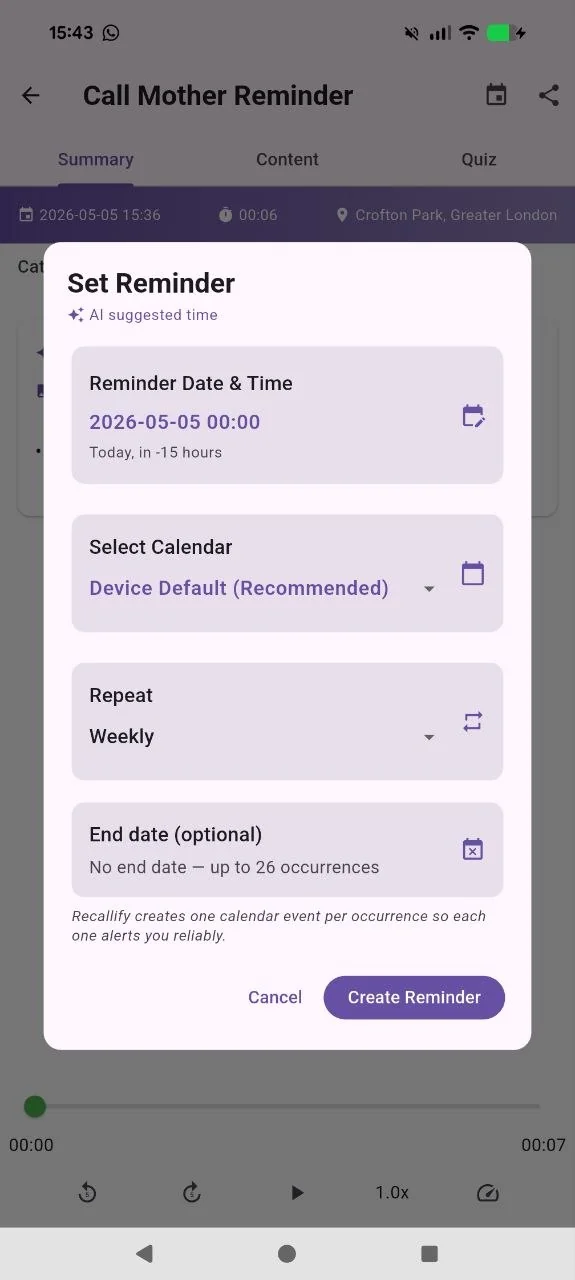
From this release, you can set any reminder to repeat: daily, on chosen days of the week, weekly, fortnightly, or monthly. Medication, physiotherapy exercises, weekly clinical appointments, the school run, recurring meetings, the Sunday admin block. Set it once, and Recallify will keep showing up at the right time.
For users managing fatigue and brain fog, this is the difference between a tool that captures information and a tool that carries the routine. The former is useful. The latter is what participants told us they actually needed.
Tip: If your medication or therapy routine has multiple steps at different times of day, set each as a separate recurring reminder. The Today panel will surface them all in order, so you can see the full day at a glance.
A new Today panel on the home tab
The pilot finding that most influenced the design of this panel was about routine. Several participants told us that the first week was the hardest because their cognitive symptoms made it difficult to remember to use the app. Once Recallify became part of a daily routine, it stopped feeling like another thing to remember and started doing the work it was designed to do.
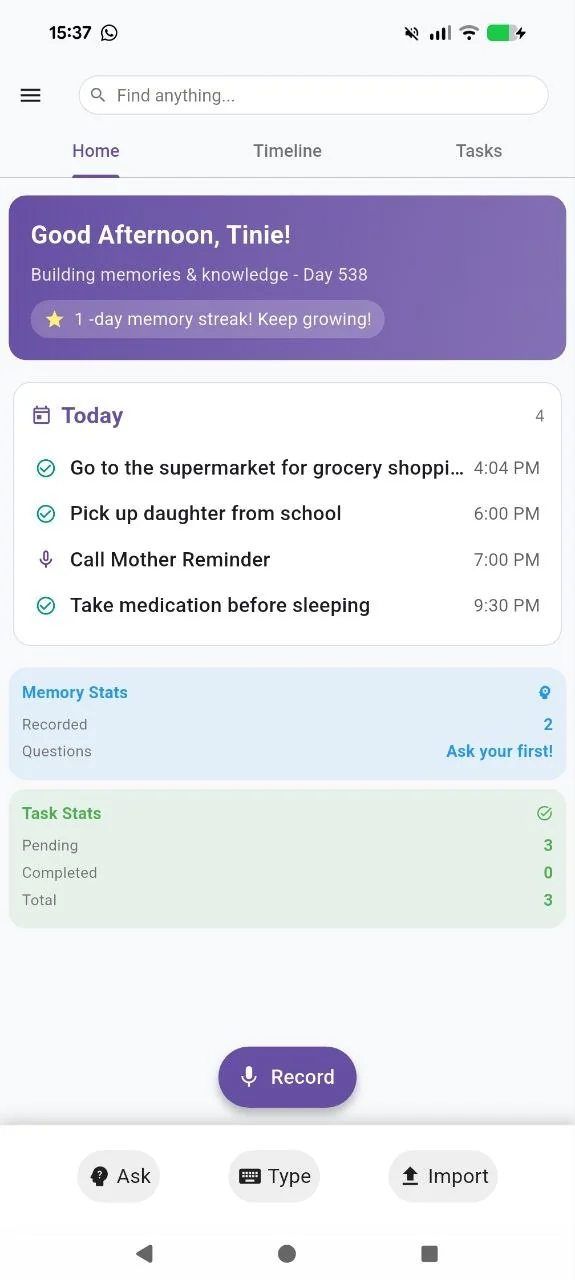
The new Today panel sits on the home tab and shows what's coming up today, your reminders, your tasks, the appointments you're heading into, in a single glance view. Open the app, see your day, move on.
For users who are managing cognitive fatigue, removing one navigation step matters. The pilot showed us that the moment of opening the app is the moment to deliver value, not the moment to ask for more decisions.
Tip: If you're new to building daily app habits, our note on building cognitive support into a daily habit walks through habit-stacking as a practical approach.
A friendlier time picker
The single most concrete piece of design feedback in the whitepaper was about the analogue clock-style time picker. Participants found it confusing. Some accidentally edited times when they meant to scroll past. The dual-layer dial, designed to be quick once learned, was too much friction the first few times.
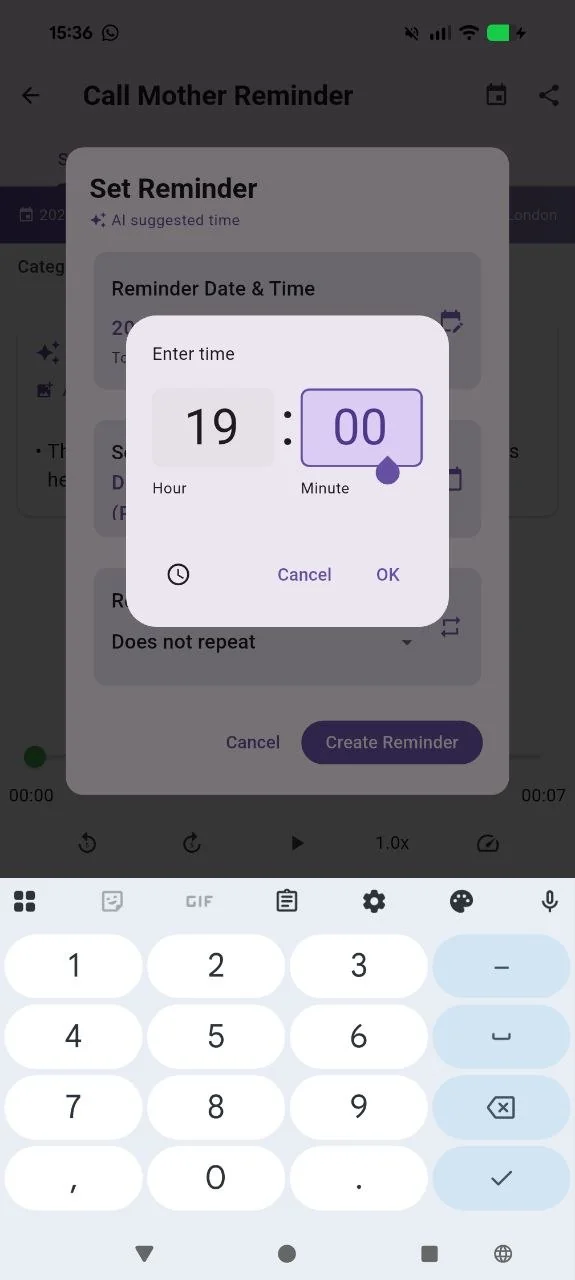
We've replaced the default with a clean numeric entry. The dial is still available for users who prefer it, but typing a time is now the default path. Several participants in the pilot described the workaround they'd developed to avoid the dial. That's the kind of feedback that should never need a second pilot to fix.
Recallify now respects your accessibility settings
This one wasn't in the pilot feedback specifically, but it's the right thing to do regardless. If you've turned off animations at the operating system level, through iOS's Reduce Motion setting or the equivalent on Android, Recallify now respects that choice across the whole platform.
Animations can be disorienting for users managing cognitive fatigue, vestibular sensitivity, or other conditions that affect motion processing. The accessible answer isn't to remove animation from the platform altogether, because it serves a useful purpose for users who don't have those needs. The accessible answer is to follow what the user has already told their device. We do that now.
Smaller improvements that add up
A handful of smaller changes shipped at the same time, none of them headline features, but together they remove dozens of small frictions across the day.
Smoother offline recording. If you start a recording and lose connection mid-way through, you'll see a one-tap recovery option that finishes the upload as soon as you're back online. No more lost recordings during the moments you most needed to capture.
Faster post-processing. Once a recording finishes processing, the card updates immediately instead of waiting for a manual refresh. You see your summaries and extracted tasks the moment they're ready.
Typed note stability. Improvements to how typed notes are processed in the background, with fewer sync issues for users who write rather than speak.
Friendlier permission prompts. Clearer explanations of what we're asking for and why, when Recallify requests access to your calendar and reminders.
What's coming next
Two threads from the whitepaper are shaping our next few releases. The first is a small, practical one: making it easier to add to an existing list or note rather than creating a new one each time. Several pilot participants used Recallify as a "dumping ground" they later filtered, and any feature that fragments rather than consolidates that store works against the offloading mechanism they value most. We're working on it.
The second is broader. The pilot's pragmatic usability score was clearly positive (+1.05), but the hedonic score was more modest (+0.63). Closing that gap, between what the platform does and how it feels to use it, is craft work on tone of voice, micro-interactions, and the affective texture of the experience. We'll keep writing about it as it ships.
A note on how we're working
One of the reasons we ran the pilot was to test something simple: can a small, dedicated team build a credible AI assisted memory and organisation platform that people living with cognitive challenges actually want to use? The answer from the pilot was yes, with caveats. The caveats are what we've been shipping.
If you're using Recallify and have something to tell us, we want to hear it. Email research@recallify.ai, or book a call with the team. The pilot showed us the value of small, structured conversations with users who live with cognitive symptoms every day. We'd like more of those.
If you'd rather start by reading the underlying findings, the full whitepaper is available as a PDF, alongside our earlier piece on Long Covid, brain fog and cognitive support.
iOS App
Get Recallify from App Store today.

Android App
Get Recallify from Google Play today.