
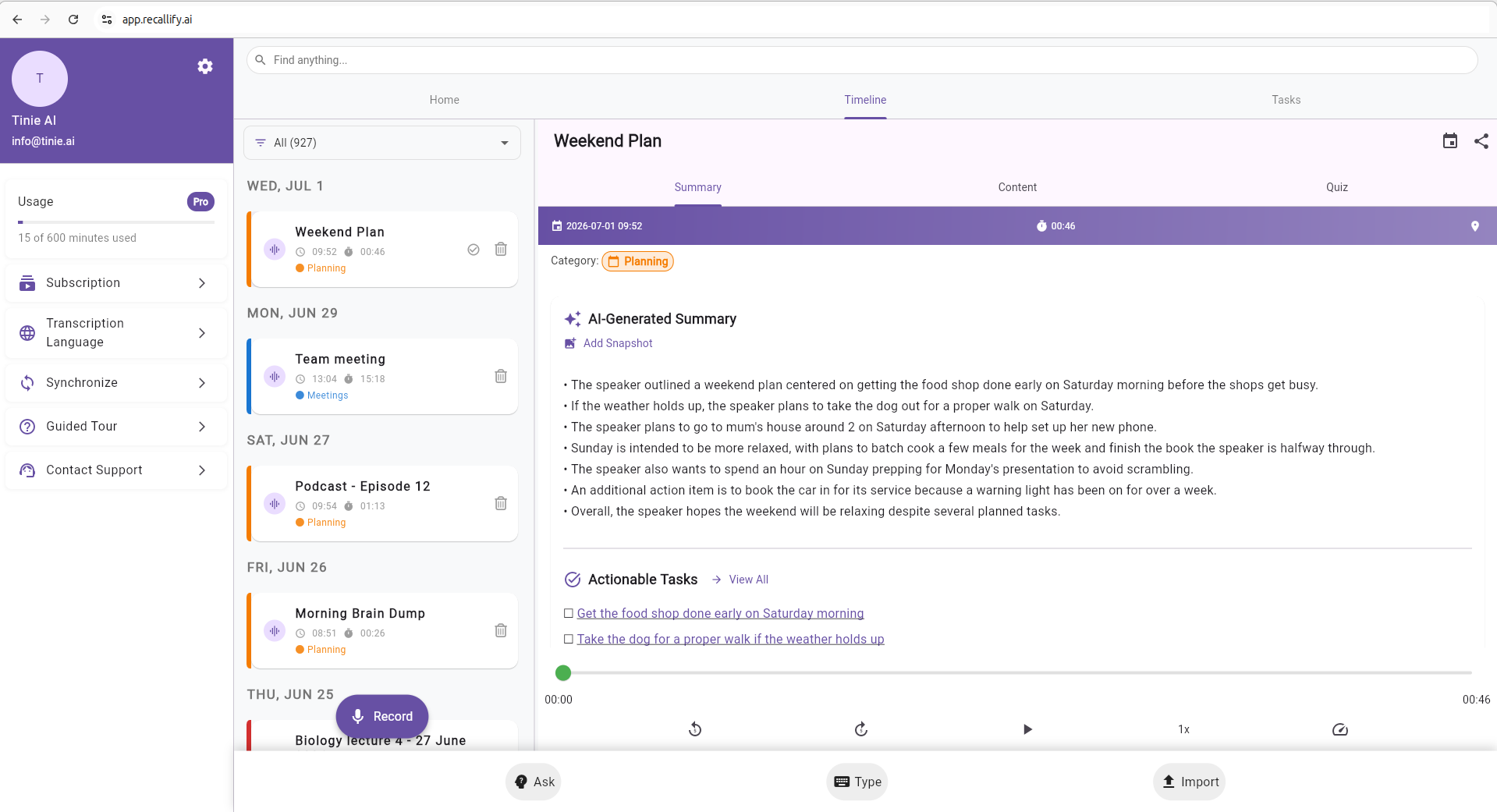
Recallify is now available as a web based memory app: the same second brain, downloaded more than 4,000 times on iOS and Android, opened straight in your browser with nothing to download. Sign in at app.recallify.ai and you can record, transcribe, summarise, plan and search from any computer, using the full size of a keyboard and screen. If you have ever wanted your notes, tasks and recordings on the machine where you do your work, this is it.
A web based memory app with nothing to install
Most memory and note tools ask you to download an app before you can start. Recallify on the web removes that step. You open a browser, sign in, and you are working. There is no install, no app store, and no waiting for updates. It also means you can work on a locked-down university or workplace computer where you are not allowed to add software, which is often the only machine a student has on campus or an employee has on a managed device. It runs in any modern browser, and we recommend Chrome for the smoothest experience because Recallify is built with Flutter and Chrome handles it best.
Because it lives in the browser, the web app also suits the moments when your phone is not the right tool: writing up a long meeting, working through study material, or planning a week where you want everything in front of you at once. It sits alongside the phone app rather than replacing it, so you can pick whichever screen fits the task.
Working in the browser does not change how your information is looked after. Recallify is GDPR compliant, registered with the UK Information Commissioner’s Office, and Cyber Essentials certified, with encrypted storage across every version of the app. Whether you open Recallify on your phone or in a browser tab, the same standards apply to what you record and save. Our accessibility statement covers both recallify.ai and app.recallify.ai, and sets out the dark mode, font size and audio review options the app offers.
Everything the app does, now in your browser
The web based memory app runs on the same codebase as our iOS and Android apps, so the things Recallify is known for all work the same way. You are not getting a cut down version. You are getting the whole tool on a bigger screen.
Record a conversation, a lecture or a passing thought and Recallify transcribes it automatically. It distils long recordings and uploaded files into clear summaries, so you do not have to re-read or re-listen to find the point. It detects tasks inside your notes and recordings and turns them into something you can act on, which takes the effort of task initiation off your plate. It can generate quizzes from your own material for active recall and spaced repetition, two study techniques with strong evidence behind them. And everything you capture goes into a searchable memory bank you can question in plain language, so a half remembered detail can be found by asking for it rather than scrolling. Recallify pulls the everyday jobs of remembering and recalling, planning your day and studying into one place, on whichever device you are sitting at.
It is not limited to what you record in the moment either. You can bring in files you already have, such as PDFs, slides and documents, and Recallify will read and summarise them alongside your notes and recordings. On a larger screen this is where the web app comes into its own, because reviewing a long document and its summary side by side is easier with the room a desktop gives you.
Record lectures and meetings, without a bot joining in
Sit in a lecture with Recallify open on your laptop and it records the room through your microphone. Afterwards you have the transcript, the summary and the tasks, with speaker identification, also called diarisation, separating who said what. It works for online sessions the same way. Open Recallify in one tab and your video call in another, whether that is Google Meet, Zoom or Microsoft Teams, and it captures the call through your microphone, without an AI notetaker bot appearing in the meeting alongside everyone else.
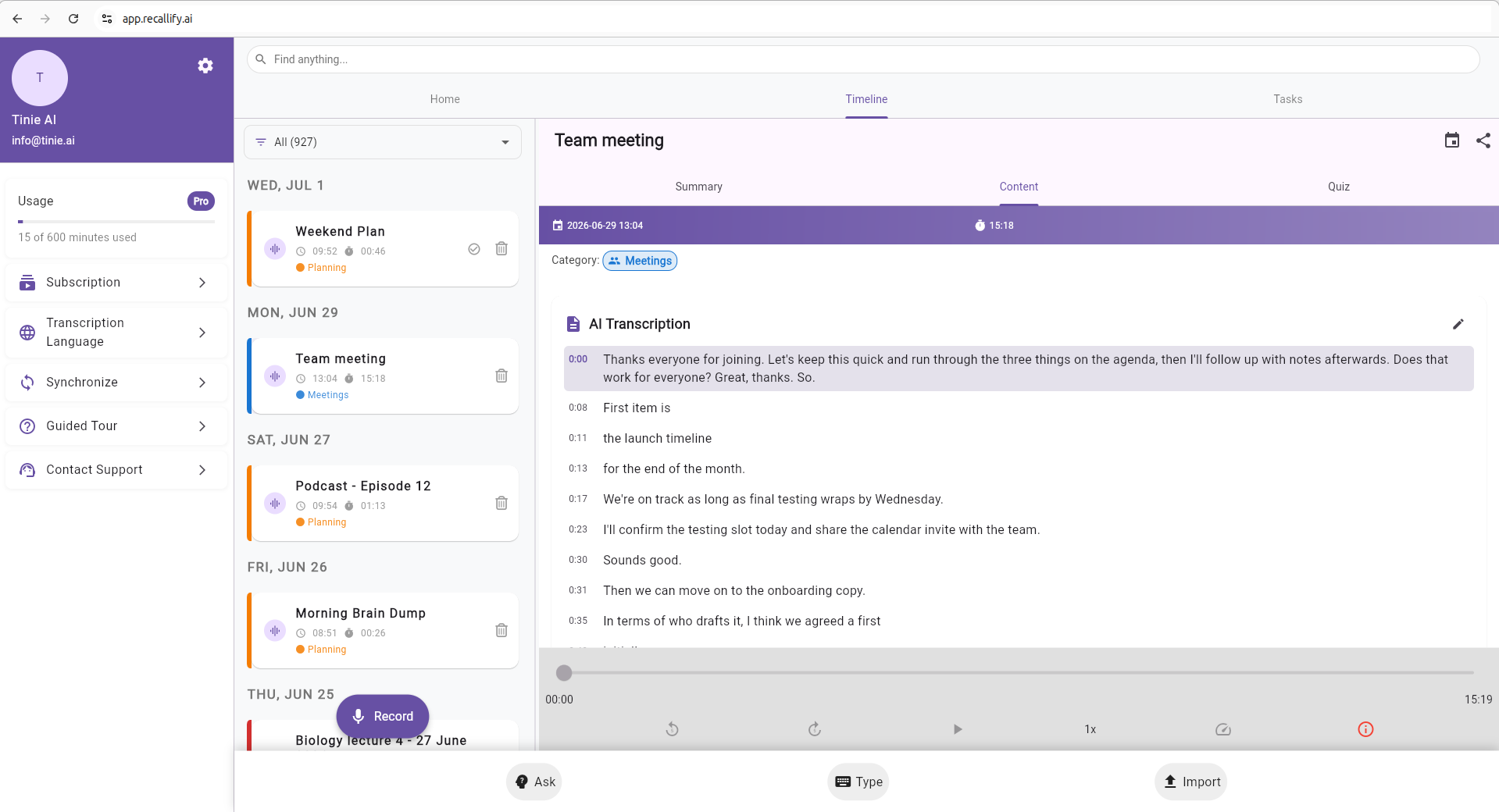
Recording a lecture changes what you can do in the room. For students with ADHD, autism or dyslexia, trying to listen, understand and write notes at the same time is where a lecture is often lost. Recording it takes that pressure off, so you can follow the session as it happens and let Recallify produce the transcript and summary, then turn the material into revision quizzes afterwards.
The same holds at work. A one-to-one with your manager, a performance review or a handover can be recorded, with everyone’s agreement, so you leave with a clear record of what was said and what you agreed rather than a page of half-finished notes. You might capture it on your phone while you are on the go, then sign in on your laptop later and work through the summary and the tasks on a proper screen.
The one thing to know is that Recallify records what the microphone can hear. Without headphones, it hears everyone in the room or on the call. With headphones it only hears your side, because the other voices never reach the microphone. As you would with any recording, let the other participants know you are capturing the conversation, and check your institution’s or employer’s policy.
Assistive technology, DSA and support at work
Note-taking and transcription software is assistive technology. Recallify AT software is approved by Student Finance England for recommendation through Disabled Students’ Allowance (DSA). A needs assessor can recommend it where it meets an essential study need. SFE decides whether to fund it for each student. The approval covers software only, shown on our pricing page as Core AT; Guided AT training and the Personal subscription are outside this approval. The browser is one way to use the approved AT software on your licensed account. See Recallify AT through DSA, software prices and supply, and the DSA assessor toolkit. At work, occupational health assessments and Access to Work consider similar tools; Recallify is not endorsed by Access to Work or any occupational health service.
A student’s needs assessor recommends suitable support and Student Finance England decides the individual funding award. Workplace support follows its own assessment and funding process. If a tool of this kind would help, the right move is to describe where studying or working breaks down for you and let the assessor recommend specific products. Our guide to Disabled Students Allowance for ADHD in England explains how that assessment works and what it can cover. The browser version matters here for a practical reason: with nothing to install, it runs on the managed campus or workplace computer you may be required to use.
A second brain that opens in a tab
The idea behind Recallify is simple: hold less in your head, and keep the rest somewhere reliable you can search. That is what people mean by a second brain, and it works best when it is always within reach. On the desktop, a second brain that opens in a tab is there the moment you need it. You capture a thought before it slips, drop in a file to be summarised, or check what you agreed in this morning’s call, all without breaking away from what you are doing.
For anyone carrying a heavy cognitive load, whether from ADHD, brain fog, fatigue or having too much to track, moving that load out of working memory and onto the screen is the point. The browser version makes the second brain part of your normal working setup rather than something you have to pick up your phone to reach. Over a day, that small reduction in friction is what turns a good tool into one you keep using.
Who the browser version is for
A web based memory app changes who Recallify can reach. Students working through reading and lecture notes on a laptop can keep summaries and quizzes on the same screen as their material. Professionals managing a heavy flow of meetings and messages can capture and plan without switching to their phone. People who prefer typing to tapping, or who find a large screen easier to read, get an interface that suits them. And anyone who does not want another app on their phone can still use the whole of Recallify.
A typical working day shows why. You keep Recallify open in a tab, capture actions as they come up in back to back calls, and let it pull those into a task list without stopping to type notes. Between meetings you drop in the slide deck you were sent and read the summary rather than the whole thing. When you wrap up, you search your memory bank for the one decision you need, instead of scrolling back through everything. None of it means reaching for your phone.
It is a natural fit for the audiences Recallify was built for. If executive function is the sticking point, the web app can act as an ADHD friendly planner that lives in the tab you already keep open all day. If memory or cognitive fatigue is the challenge, having your second brain on the desktop means less mental effort spent holding things in mind while you work.
Your account works across your phone and the web
You use one Recallify account everywhere. Sign in on the web with the same details you use on the phone app, and your subscription travels with you: there is no separate purchase and no second account to manage. Recallify keeps your working data in the browser you sign in on, so it helps to use the same browser day to day rather than hopping between several. If you already have Recallify on your phone, the web is an addition to how you use it, not a switch you have to make.
Getting started and pricing
You can start straight from the browser. New users go through a short onboarding funnel and can begin a seven-day free trial, so you can try the full web app before committing. Payment is handled securely by Stripe, which means your card details are entered directly with Stripe and never seen or stored by us. Pricing is exactly the same as everywhere else Recallify runs, so the web based memory app does not cost more or less than the phone apps; you can see the current plans on our pricing page. If you would rather start on your phone and add the web later, the iOS and Android apps use the same account.
Where Recallify comes from
We built Recallify to close the gap between what is known clinically about memory and attention and the everyday tools people have to live with them. Our co-founder, Dr Sarah Rudebeck, is a senior clinical neuropsychologist who spent fifteen years in the NHS working with people facing neurological, neurodevelopmental and learning challenges, and the app is shaped directly by that experience. Recallify is currently being evaluated in a feasibility study funded by the National Institute for Health and Care Research, looking at brain injury self-management, run in partnership with the University of Essex. Putting the full tool in the browser, as a web based memory app you can open anywhere, is part of the same goal: making cognitive support easy to reach, wherever you happen to be working. Wherever you start, on the phone or in a tab, it is the same Recallify and the same account.
Recallify is designed as an everyday support tool and is not a medical device. It does not provide diagnosis or clinical decision support, and is intended to complement, not replace, professional medical care.
iOS App
Get Recallify from the App Store to boost your memory, learning, and task management.

Android App
Get Recallify from Google Play to boost your memory, learning, and task management.

Web App
Get Recallify in your browser to boost your memory, learning, and task management.